Few things are more frustrating than a slow website. You click a link, wait for the page to load, and nothing happens. After a few seconds, many visitors simply leave and look elsewhere.
If you own a website, a slow loading speed can hurt your traffic, user experience, and even your search engine rankings. While there are many reasons why a website might be slow, one of the most common causes is surprisingly simple: images.
Many website owners spend time improving their design, writing content, and installing new features, but they often overlook image optimization. A single oversized image can have a bigger impact on page speed than most people realize.
In this guide, you'll learn how images affect website performance, common mistakes that slow websites down, and simple ways to make your pages load faster.
Why Website Speed Matters
Website speed affects almost everything.
A fast website creates a better experience for visitors, while a slow website can drive people away.
When pages load quickly:
- Visitors stay longer
- More pages are viewed
- Bounce rates decrease
- User satisfaction improves
- Search engines can crawl pages more efficiently
On the other hand, slow websites often struggle to keep visitors engaged.
Imagine entering a store where the door takes ten seconds to open. Most people would walk away before even seeing what's inside.
The same thing happens online.
How Images Affect Website Speed
Every image on your website must be downloaded before it can be displayed.
When a visitor opens your page, their browser requests:
- Text
- Images
- Stylesheets
- Scripts
- Videos and other files
Images are usually the largest files on a webpage.
A typical webpage may contain:
- 100 KB of text
- 500 KB of code
- 5 MB of images
In many cases, images make up more than 70% of the total page size.
This is why image optimization has such a large impact on website speed.
The Problem with Large Images
Modern smartphones and cameras take incredibly detailed photos.
While these images look great, they are often much larger than necessary for websites.
For example:
A phone photo may be:
- 4000 × 3000 pixels
- 8 MB file size
But your website might display it at:
- 1200 × 900 pixels
This means visitors are downloading much more data than they actually need.
The result:
- Slower loading
- Increased bandwidth usage
- Worse mobile performance
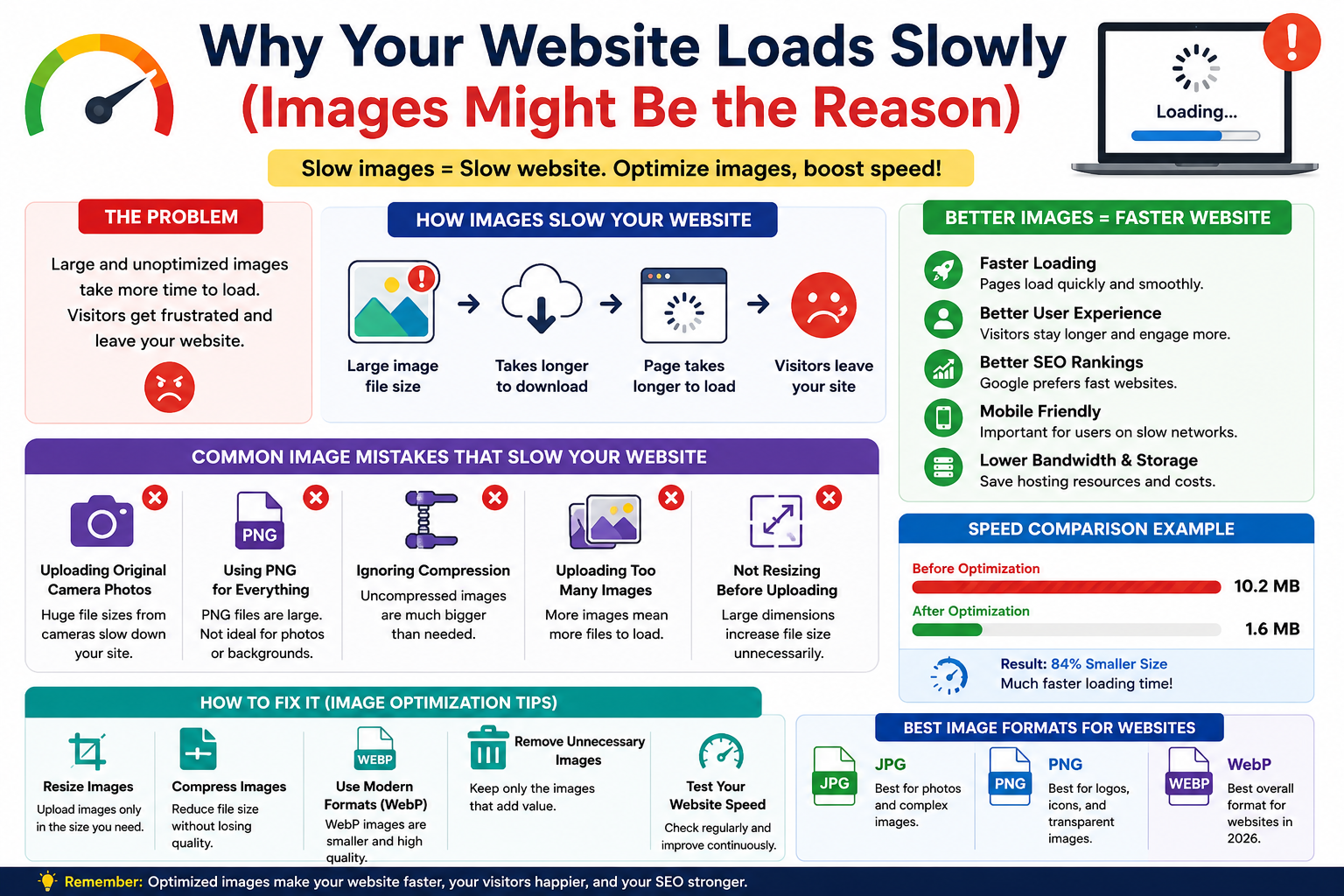
Common Image Mistakes That Slow Websites Down
Many website owners accidentally make their websites slower without realizing it.
Let's look at some common mistakes.
Uploading Original Camera Photos
One of the biggest mistakes is uploading photos directly from a phone or camera.
Original images are often far larger than necessary.
Before uploading:
- Resize images
- Compress files
- Convert to web-friendly formats
This simple step can dramatically improve page speed.
Using PNG for Everything
PNG is excellent for logos and transparent graphics.
However, using PNG for regular photographs can create unnecessarily large files.
For photos:
- JPG is usually better
- WebP is often even better
Choosing the right format makes a noticeable difference.
Ignoring Compression
Many users upload images without compressing them first.
Compression removes unnecessary data while keeping images visually similar.
A 5 MB image can often be reduced to:
- 2 MB
- 1 MB
- Sometimes even less
without obvious quality loss.
Uploading Too Many Images
More images mean more files that visitors must download.
While images improve visual appeal, using too many can slow a page considerably.
Focus on quality over quantity.
The Best Image Formats for Speed
Choosing the right image format is one of the easiest ways to improve performance.
JPG
Best for:
- Photographs
- Blog images
- Product photos
Advantages:
- Good quality
- Small file size
- Universal compatibility
PNG
Best for:
- Logos
- Icons
- Screenshots
- Transparent backgrounds
Advantages:
- Excellent quality
- Transparency support
Disadvantages:
- Larger file sizes
WebP
Best for:
- Websites
- Blogs
- Online stores
Advantages:
- Smaller file sizes
- High quality
- Transparency support
For most websites in 2026, WebP is one of the best choices available.
How Image Compression Helps
Image compression is the process of reducing file size while maintaining visual quality.
Think of it like packing a suitcase efficiently.
The contents remain the same, but they take up less space.
Good compression can:
- Improve loading speed
- Reduce storage usage
- Lower bandwidth costs
- Improve mobile performance
This is one of the easiest improvements website owners can make.
Why Mobile Users Are Affected Most
Not everyone visits websites using high-speed internet.
Many people browse using:
- Mobile networks
- Public Wi-Fi
- Slower internet connections
Large images take longer to download on these networks.
A page that loads quickly on a desktop computer may feel painfully slow on a smartphone.
Optimized images create a better experience for all users.
How Slow Images Affect SEO
Search engines want to provide users with good experiences.
While content remains important, speed also plays a role.
Slow websites often experience:
- Higher bounce rates
- Lower engagement
- Reduced user satisfaction
Optimized images help create faster pages, which can contribute to better overall performance.
Image optimization alone won't guarantee higher rankings, but it supports a healthier website.
Simple Ways to Make Your Website Faster
If you want to improve website speed, start with these steps:
Resize Images
Don't upload images larger than necessary.
Compress Images
Reduce file size before publishing.
Use WebP
Modern formats often provide better performance.
Remove Unnecessary Images
Every image adds weight to a page.
Test Your Website
Regular speed testing helps identify oversized files.
Small improvements add up over time.
Real-World Example
Imagine you have ten product photos.
Each photo is:
- 3 MB
Total image weight:
- 30 MB
After optimization:
Each image becomes:
- 400 KB
New total:
- 4 MB
That's a reduction of more than 80%.
Visitors will notice the difference immediately.
Frequently Asked Questions
Are images really the biggest cause of slow websites?
In many cases, yes.
Images often account for the majority of a webpage's size.
Which image format is best for website speed?
WebP usually provides the best balance of quality and file size.
Will compression ruin image quality?
Not if done correctly.
Most users won't notice the difference after proper compression.
Should I optimize every image?
Yes.
Every optimized image contributes to a faster website.
Final Thoughts
If your website feels slow, images are one of the first things you should check.
Large files, incorrect formats, and uncompressed photos can dramatically increase loading times and create a poor experience for visitors.
The good news is that image optimization is one of the easiest website improvements you can make. By resizing images, choosing modern formats like WebP, and compressing files before uploading, you can significantly improve performance without sacrificing quality.
A faster website keeps visitors happy, improves mobile usability, and creates a stronger foundation for long-term growth. Sometimes, the difference between a slow website and a fast one comes down to something as simple as optimizing your images.